Quick Start
In this guide you'll train your first bot, watch it play, and then change its deck and what it learns. Install RoyaleGym first: see Install.
1. Make the Quickstart File
In your terminal, in the royale folder with (venv) showing, open a new empty file in a text
editor:
Now copy the whole file below (the copy button is in its top right corner), paste it into the editor, and save (Ctrl+S, or Cmd+S on a Mac). Because you made it from the terminal, it's already in the right folder with the right name.
"""Train a Clash Royale bot.

Install first (https://royalegym.github.io/RoyaleGym/install/), then:

    python quickstart.py

It prints a line after every update. To watch it play, run `royaleviser` in a second
terminal. Stop it with Ctrl+C whenever you like: it saves, and when you run it again it
carries on where it stopped.
"""


def build_env():
    from royalegym import ClashParallelEnv, RustEngine
    from royalegym import DefaultStateMutator, SpatialObsBuilder, TileActionParser
    from royalegym import CombinedReward, CrownReward, TowerHPReward, WinLossReward
    from royalegym import GameOverCondition

    deck = ["Knight", "Archer", "Giant", "Minions", "Fireball", "Zap", "Cannon", "Musketeer"]
    decision_ms = 500  # the bot decides what to do every half second of game time

    # How each battle starts: both sides get the deck above.
    state_mutator = DefaultStateMutator(decks=[deck, deck])

    # What the bot sees: the arena as a grid of tiles, plus its hand, elixir and the clock.
    obs_builder = SpatialObsBuilder()

    # What the bot can do: wait, or play one of the 4 cards in its hand on one of 18 x 32 tiles.
    action_parser = TileActionParser()

    # What the bot is paid for. Winning is what counts; the other two help it learn faster.
    reward_fn = CombinedReward([
        (WinLossReward(), 1.0),  # +1 for a win, -1 for a loss
        (CrownReward(), 0.2),    # for each crown taken, minus each crown lost
        (TowerHPReward(), 0.1),  # tower damage done, minus tower damage taken
    ])

    # When a battle ends. A battle always ends by itself (3 minutes, plus overtime),
    # so nothing needs cutting short.
    termination_cond = GameOverCondition()
    truncation_cond = None

    return ClashParallelEnv(
        RustEngine(),
        state_mutator=state_mutator,
        obs_builder=obs_builder,
        action_parser=action_parser,
        reward_fn=reward_fn,
        termination_cond=termination_cond,
        truncation_cond=truncation_cond,
        decision_ms=decision_ms,
    )


if __name__ == "__main__":
    from royalelearn import Learner

    learner = Learner(
        build_env,
        n_envs=32,                    # battles played at once; more keeps the GPU busier
        opponent="random",            # who it plays: "random" (a bot making random moves),
                                      # "noop" (never plays a card) or "self" (copies of itself)
        device="auto",                # your graphics card if torch can see it, else the CPU
        trunk_channels=64,            # the network's width...
        trunk_blocks=4,               # ...and depth. Bigger can learn more; each update is slower
        steps_per_update=16_384,      # decisions collected before each update of the network
        ppo_batch_size=16_384,        # decisions per update; set this equal to steps_per_update
        ppo_minibatch_size=2_048,     # decisions per gradient step: as many as your GPU's memory
                                      # holds (the trainer says so before it starts if it can't)
        ppo_epochs=2,                 # passes over each batch
        policy_lr=2e-4,               # how big a step the policy takes each update
        critic_lr=2e-4,               # the same, for the part that predicts the reward
        ppo_ent_coef=0.01,            # how much it is pushed to keep trying new moves
        checkpoint_every=200_000,     # save every 200,000 decisions (Ctrl+C saves too)
        timestep_limit=1_000_000_000, # stop after a billion decisions
        save_dir="runs/quickstart",   # checkpoints and logs go here
        viser=True,                   # watch a battle live: run `royaleviser` in a second terminal
        log_to_wandb=False,           # True draws charts on wandb.ai (pip install wandb)
    )
    learner.learn()
You don't need to understand all of it yet. The parts you'll change first are the deck line
and the reward_fn lines, and this page shows you how.
Don't double-click it
Double-clicking quickstart.py runs it in a window that closes straight away. To change
it, open it again from the terminal: notepad quickstart.py on Windows,
open -e quickstart.py on a Mac, nano quickstart.py on Linux. To run it, use the
terminal, as below.
2. Run It
3. What You'll See
First it prints one line about the run. Then, each time the bot has learned from a batch of
battles, it prints an update line:
training in runs\quickstart on RustEngine: 32 battles at once, a line every 16,384 steps
update     1  steps      16,384  battles   31  crowns  +0.71 a battle     71 s
update     2  steps      32,768  battles   37  crowns  +0.43 a battle     56 s
update     3  steps      49,152  battles   50  crowns  +1.00 a battle     36 s
That's from an RTX 4070 Ti on Windows. On a Mac or Linux the folder shows as
runs/quickstart. Your numbers will be different: they change from run to run, and a slower
graphics card or processor takes more seconds per update.
The first update line takes the longest, because it includes starting up. As long as no error
appeared, it's working. Now and then it also prints a checkpoint line: that's it saving its
progress.
| Column | What it means |
|---|---|
update |
How many times the bot has learned so far. |
steps |
How many moves it has made in all, across every battle. |
battles |
How many battles finished since the last line. |
crowns |
Crowns it took minus crowns it lost, per battle. It goes from -3 (it loses every battle 0-3) to +3 (it wins every battle 3-0). A - means no battle finished yet. |
s |
How many seconds that update took. |
crowns is the number to watch. If it goes up over time, your bot is learning. Three things
to know about it:
- It jumps up and down from line to line, because each line only covers the 30 to 50 battles that just finished. Look at the trend over 20 lines or more.
- It starts above zero, because the random bot waits 9 moves out of 10.
- Near +3, your bot beats the random bot 3-0 almost every time.
Is it using my graphics card? If it weren't, it would have printed a warning that starts
with "No GPU that torch can use was found". No warning means it's on the graphics card. You can
watch it work in Task Manager > Performance > GPU on Windows, or with nvidia-smi in another
terminal on Linux. On a Mac you always see the warning, because a Mac has no NVIDIA card.
4. How Long Should I Leave It?
As long as you like. There's no point where it's "done": it keeps slowly getting better, and you can stop and carry on whenever you want. Bots for games like this usually need many hours of training before they play well.
In the quickstart, your bot plays a bot that makes random moves. A high crowns number means it
beats that random bot, which is a start but not the same as being good. Once crowns stays high,
your bot has learned most of what the random bot can teach it. Then try opponent="self", so it
plays against copies of itself instead. That trains a new bot, so also change save_dir to a
new name, such as runs/selfplay: in the old folder it refuses to start. Your first bot stays in
runs/quickstart. Against itself, crowns stays near zero, because both sides get better
together; watch it play to see how it's doing.
Leaving it running overnight
- Keep a laptop plugged in, with the lid open.
- Turn off sleep while it trains: Settings > System > Power on Windows, Settings > Power >
Automatic Suspend on Ubuntu. On a Mac, start training with
caffeinate -i python quickstart.pyinstead, which keeps it awake. - Loud fans are normal. It's using the graphics card and processor fully.
- Training uses a lot of memory (RAM). Close other big programs.
- Playing games on the same computer slows training down, and can make it run out of graphics memory.
- If the computer restarts, for example for an update, run
python quickstart.pyagain. It carries on from its last savedcheckpoint.
5. Watch It Play
While it trains, open a second terminal, turn on the virtual environment, and start the viewer:
A window opens and shows one of the battles your bot is playing, live: your bot on one side, its opponent on the other.
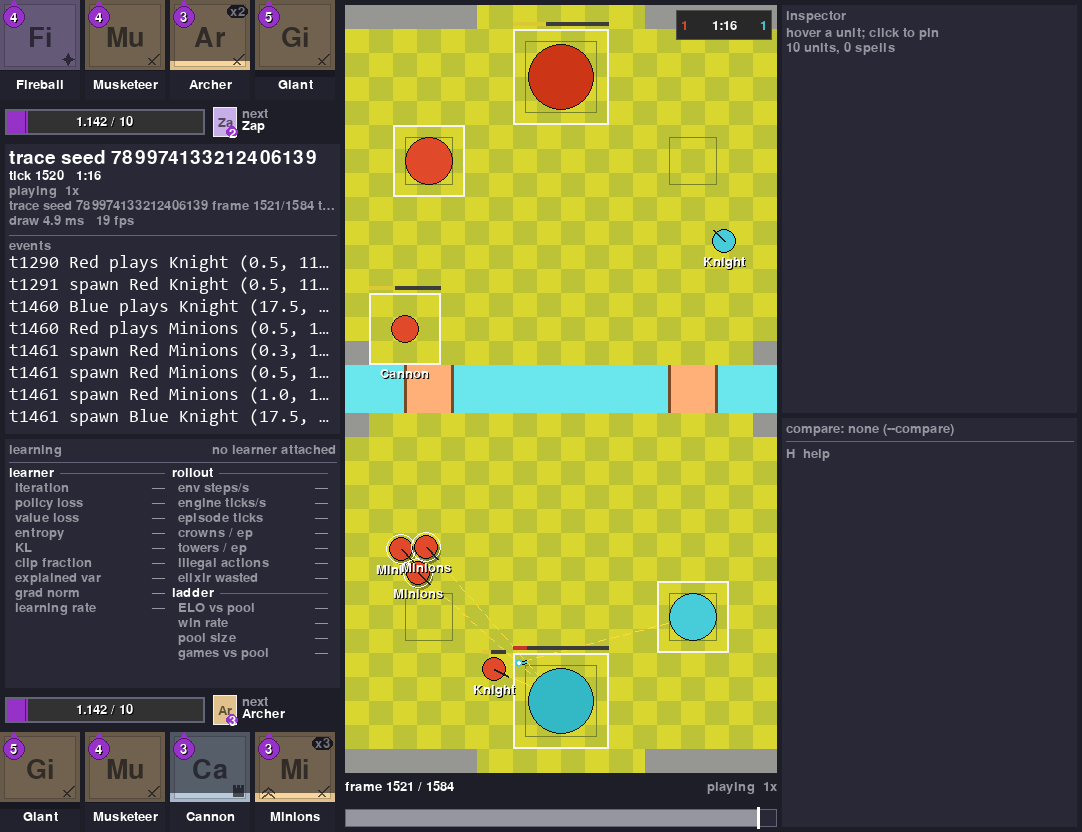
Press Space to pause, h to see every key, and q to close it. The viewer is a separate program: pausing or closing it doesn't pause or stop training, and you can open it again any time.
6. Stop and Carry On
To stop, click the training terminal and press Ctrl+C once (Control+C on a Mac too, not Cmd+C). It prints:
It finishes the update it's on, saves, and stops. Wait for the checkpoint line: with a
graphics card that takes up to a minute, on a computer without one it can take many minutes.
Your bot is saved.
If you press Ctrl+C a second time, or close the window, it stops at once. You then keep
everything up to its last checkpoint line. The first one comes after about 13 update lines,
so if it stops before that, there's nothing to carry on: delete the folder and start again.
To carry on, run the same command again:
Its first line now ends with carrying on from and the checkpoint it loaded. Everything it has
learned is in the runs\quickstart folder. To start again from nothing, delete that folder:
Remove-Item -Recurse runs\quickstart in PowerShell, rm -r runs/quickstart on a Mac or Linux.
7. Watch a Whole Battle Later
After you've stopped training, you can make your bot play one battle against the random bot and
watch the whole thing. Make a second file, watch.py, the same way as in step 1
(notepad watch.py on Windows, touch watch.py and open -e watch.py on a Mac,
nano watch.py on Linux), and paste this into it:
import random

from royalegym import play_battle
from royalelearn import Learner

from quickstart import build_env

bot = Learner.load_policy("runs/quickstart")
battle = play_battle(build_env(), blue=bot, red="random", seed=random.randrange(1_000_000),
                     save_to="my_bot_battle.msgpack")
print("Crowns:", battle.crowns[0], "-", battle.crowns[1])
Run it, then open the battle in the viewer:
Learner.load_policy("runs/quickstart") loads the newest save of your bot. Your bot plays blue,
at the bottom. Run watch.py again for a new battle each time. If you change save_dir in
quickstart.py later, change runs/quickstart here to match.
8. Use Your Own Deck
Open quickstart.py again (notepad quickstart.py, open -e quickstart.py or
nano quickstart.py) and find this line in build_env:
Replace the eight names with yours. Keep each name inside quotes, with commas between them, and keep the spaces at the start of the line. For example, Hog 2.6:
deck = ["HogRider", "Musketeer", "Cannon", "IceGolemite", "IceSpirits", "Skeletons", "Fireball", "Log"]
Names are written without spaces (only Elixir Collector keeps its space), and some differ
from the game: IceGolemite is the Ice Golem, IceSpirits the Ice Spirit and Log The Log. The
table of names that differ lists
the rest. A wrong name stops it with an error that suggests the closest real ones, such as
names 'Archers', which this engine's catalogue of 136 cards does not have (close: Archer, ...). To search for a name, run this (change ice to part of the name you want):
python -c "from royalegym import RustEngine; print([c.name for c in RustEngine().cards() if 'ice' in c.name.lower()])"
Then change save_dir="runs/quickstart" to a new name, such as save_dir="runs/hog", and the
same in watch.py. Otherwise it carries on training your old bot with the new deck, instead of
starting a new one. It says so in one line before it starts:
build_env makes a different environment from this run's last one: the decks.
Evolutions and heroes
Add a forms line under your deck, with one number per card in the same order: 0 the normal
card, 1 its evolution, 2 its hero. Then pass it to DefaultStateMutator:
    deck = ["HogRider", "Musketeer", "Cannon", "IceGolemite", "IceSpirits", "Skeletons", "Fireball", "Log"]
    forms = [0, 1, 0, 0, 0, 1, 0, 0]  # evolved Musketeer and evolved Skeletons

    state_mutator = DefaultStateMutator(decks=[deck, deck], forms=[forms, forms])
A hero has an ability button, so with a hero (a 2) also change the action parser line to:
So your bot can see which of its cards are evolved, also change the observation line to:
Both of these change what the bot sees or can do, so they need a new bot: use a new save_dir.
If a card has no evolution or hero in RoyaleGym yet, you get an error that says so. The lists of
cards that have one are in Game Values.
Good to know about decks
- Both sides play the deck you give, so your bot learns a mirror match.
- Every card and tower is level 11, the tournament standard. The towers are the normal Princess Towers; there's no tower troop to choose.
- If you give the two sides different decks (
decks=[my_deck, other_deck]), your bot plays both sides at random, so it learns both decks.
9. Change What It Learns
The reward is how you tell your bot what you want. After every move it gets a score, and it
learns to do whatever makes that score high. In quickstart.py it's these lines:
    reward_fn = CombinedReward([
        (WinLossReward(), 1.0),  # +1 for a win, -1 for a loss
        (CrownReward(), 0.2),    # for each crown taken, minus each crown lost
        (TowerHPReward(), 0.1),  # tower damage done, minus tower damage taken
    ])
Each line inside the brackets is one thing it gets paid for, and the number is how much that counts. For example, to also charge it for wasting elixir by sitting at 10, do two things:
-
Add
ElixirLeakPenaltyto the end of the import line above, which becomes: -
Add one line inside the brackets:
Keep the number next to WinLossReward the biggest one. The others are hints that help your bot
find its way to a win. If a hint is worth more than winning, the bot learns to chase the hint
instead.
Change save_dir to a new name here too, then run it again. The rewards that come with
RoyaleGym, and how to write your own, are on Reward Functions.
Next
- FAQ: the questions everyone asks.
- It Doesn't Work: error messages and what to do about them.
- Training an Agent: when you're ready to go further.